GLTF 模型加载
本章介绍如何在地图之中加入 GLTF 模型。
GLTFModel用于创建 GLTF 模型对象
模型工具以 Javascript API GL 的附加库的形式加载:
引入时须传入&libraries=model 参数(查看:Javascript API GL 加载参数说明)
<script
  charset="utf-8"
  src="https://map.qq.com/api/gljs?v=1.exp&key=OB4BZ-D4W3U-B7VVO-4PJWW-6TKDJ-WPB77&libraries=model"
></script>

代码示例如下(本代码不含 HTML 部分):
var center = new TMap.LatLng(39.994104, 116.307503); // 设置中心点坐标
// 初始化地图
var map = new TMap.Map('container', {
  center: center,
  zoom: 19,
  pitch: 50,
  rotation: -20,
});
var model = new TMap.model.GLTFModel({
  url: 'https://mapapi.qq.com/web/visualization/demo-asset/airplane.glb',
  map: map,
  id: 'model',
  position: new TMap.LatLng(39.994104, 116.307503, 100), // 模型锚点所对应的经纬度坐标
  rotation: [0, -90, 0], // 模型XYZ三轴上的旋转角度
  scale: [20, 20, 30], // 模型在XYZ三轴上的缩放比例
});
// model资源加载完成回调
model.on('loaded', () => {
  console.log('模型加载成功');
});
GLTF 模型沿线移动
模型沿线移动需要 Javascript API GL 的附加库的支持: 引入时须传入&libraries=geometry,model 参数(查看:Javascript API GL 加载参数说明)
需要注意model 附加库必须在 geometry 附加库之后引入
<script
  charset="utf-8"
  src="https://map.qq.com/api/gljs?v=1.exp&key=OB4BZ-D4W3U-B7VVO-4PJWW-6TKDJ-WPB77&libraries=geometry,model"
></script>
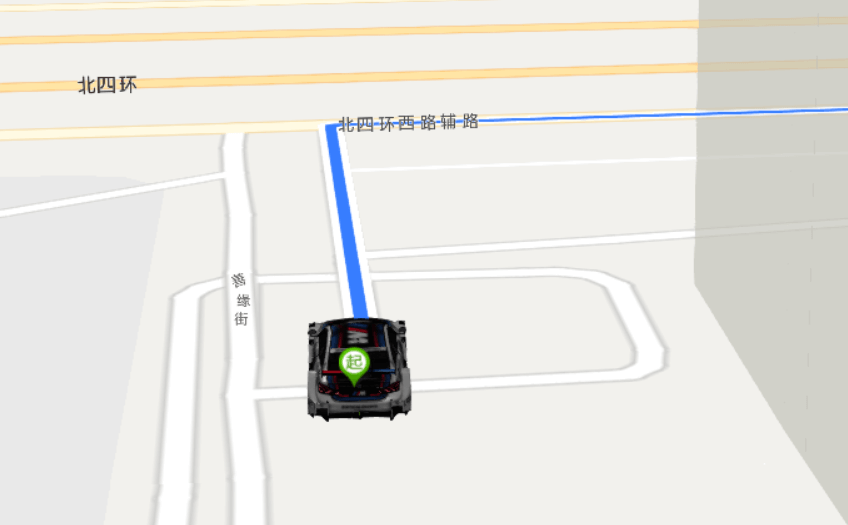
代码示例如下(本代码不含 HTML 部分):
var map;
var center = new TMap.LatLng(39.98303045328632, 116.31203627649461); // 设置中心点坐标
var roation;
var path = [
  // 路径
  {
    lat: 39.984608,
    lng: 116.313765,
    height: 0,
  },
  {
    lat: 39.985155,
    lng: 116.313737,
    height: 0,
  },
  {
    lat: 39.985211,
    lng: 116.315639,
    height: 0,
  },
  {
    lat: 39.985241,
    lng: 116.31618300000001,
    height: 0,
  },
  {
    lat: 39.985009000000005,
    lng: 116.31623300000001,
    height: 0,
  },
  {
    lat: 39.98476000000001,
    lng: 116.31626500000002,
    height: 0,
  },
  {
    lat: 39.98424500000001,
    lng: 116.31638000000001,
    height: 0,
  },
  {
    lat: 39.98257900000001,
    lng: 116.31652600000001,
    height: 0,
  },
  {
    lat: 39.98261000000001,
    lng: 116.31593500000001,
    height: 0,
  },
  {
    lat: 39.98257800000001,
    lng: 116.31516200000002,
    height: 0,
  },
  {
    lat: 39.98254200000001,
    lng: 116.31358200000001,
    height: 0,
  },
  {
    lat: 39.98249300000001,
    lng: 116.31252200000002,
    height: 0,
  },
  {
    lat: 39.982441000000016,
    lng: 116.31104500000002,
    height: 0,
  },
  {
    lat: 39.982503000000015,
    lng: 116.30931600000002,
    height: 0,
  },
  {
    lat: 39.982503000000015,
    lng: 116.30871900000002,
    height: 0,
  },
  {
    lat: 39.98248700000001,
    lng: 116.30821500000002,
    height: 0,
  },
  {
    lat: 39.98240100000001,
    lng: 116.30811800000002,
    height: 0,
  },
  {
    lat: 39.98022500000001,
    lng: 116.30821900000002,
    height: 0,
  },
  {
    lat: 39.98012100000001,
    lng: 116.30821300000002,
    height: 0,
  },
  {
    lat: 39.98012400000001,
    lng: 116.30815100000002,
    height: 0,
  },
];
var MoveButton = document.querySelector('.beginMove'); // 开始移动按钮
var stopButton = document.querySelector('.stopMove'); // 结束移动按钮
var pauseButton = document.querySelector('.pauseMove'); // 暂停移动按钮
var resumeButton = document.querySelector('.resumeMove'); // 恢复移动按钮
var startPosition = new TMap.LatLng(39.984607811550845, 116.31375617987158); // 路线规划起点
var endPosition = new TMap.LatLng(39.980242331179504, 116.30780690393772); // 路线规划终点
// 初始化地图
map = new TMap.Map('container', {
  center: center,
  zoom: 17,
  pitch: 0,
});
new TMap.MultiMarker({
  // 创造MultiMarker显示起终点标记
  id: 'marker-layer',
  map: map,
  styles: {
    start: new TMap.MarkerStyle({
      width: 25,
      height: 35,
      anchor: { x: 16, y: 32 },
      src: 'https://mapapi.qq.com/web/lbs/javascriptGL/demo/img/start.png',
    }),
    end: new TMap.MarkerStyle({
      width: 25,
      height: 35,
      anchor: { x: 16, y: 32 },
      src: 'https://mapapi.qq.com/web/lbs/javascriptGL/demo/img/end.png',
    }),
  },
  geometries: [
    {
      id: 'start',
      styleId: 'start',
      position: startPosition,
    },
    {
      id: 'end',
      styleId: 'end',
      position: endPosition,
    },
  ],
});

// 创建 MultiPolyline显示路径折线
new TMap.MultiPolyline({
  id: 'polyline-layer',
  map: map,
  styles: {
    style_blue: new TMap.PolylineStyle({
      color: '#3777FF',
      width: 8,
      borderWidth: 5,
      borderColor: '#FFF',
      lineCap: 'round',
    }),
  },
  geometries: [
    {
      id: 'pl_1',
      styleId: 'style_blue',
      paths: path,
    },
  ],
});
// }
// 创建模型
// GLTFModel文档地址:https://lbs.qq.com/webApi/javascriptGL/glDoc/glModel
var model = new TMap.model.GLTFModel({
  url: 'https://mapapi.qq.com/web/jsapi/jsapi-gl/assets/model/scene.gltf',
  map: map,
  id: 'model',
  position: startPosition, // 模型初始位置
  rotation: [0, 180, 0], // 模型XYZ三轴上的旋转角度
  scale: 1000, // 模型在XYZ三轴上的缩放比例
});
// // model资源加载完成回调
model.on('loaded', () => {
  console.log('模型加载成功');
  // 启用模型沿线移动演示
  MoveButton.disabled = false;
});
model.on('moving', function (e) {
  if (!e.passedPath) return;
  // geometry文档地址:https://lbs.qq.com/webApi/javascriptGL/glDoc/glDocGeometry
  roation = TMap.geometry.computeHeading(
    // 计算两点之间的航向
    e.passedPath[e.passedPath.length - 2].position,
    e.passedPath[e.passedPath.length - 1].position
  );
  center = TMap.geometry.computeDestination(
    // 根据起点、朝向和距离计算终点
    e.passedPath[e.passedPath.length - 1].position,
    roation,
    60
  );
  map.easeTo(
    // 平滑过渡到指定状态
    {
      center: center,
      rotation: e.rotation[1] + 180,
      zoom: 20,
      pitch: 70,
    },
    {
      duration: 300,
    }
  );
});
function beginMove() {
  // 模型开始移动
  var paths = path.map((item) => {
    return {
      position: new TMap.LatLng(item.lat, item.lng),
    };
  });
  model.moveAlong({
    // 移动过程中每个节点的坐标
    path: paths,
    duration: 15000, // 完成移动所需的时间 单位毫秒
    degreeToNorth: 180, // 把模型正方向旋转至正北方向所需的角度 默认为0
  });
}

function stopMove() {
  // 结束模型移动
  model.stopMove();
}
function pauseMove() {
  // 暂停移动
  model.pauseMove();
}

function resumeMove() {
  // 恢复移动
  model.resumeMove();
}
MoveButton.addEventListener('click', beginMove);
stopButton.addEventListener('click', stopMove);
pauseButton.addEventListener('click', pauseMove);
resumeButton.addEventListener('click', resumeMove);
试试AI总结
不想看文档?直接问AI~

这篇文档对您是否有帮助?
 有帮助
有帮助
 没帮助
没帮助