annotation数据的内容展示View 更多...
#import <QAnnotationView.h>
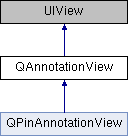
类 QAnnotationView 继承关系图:
构造函数 | |
| (id) | - initWithAnnotation:reuseIdentifier: |
| 初始化并返回一个annotationView 更多... | |
| (void) | - prepareForReuse |
| 当从reuse队列里取出时被调用 | |
| (void) | - setSelected:animated: |
| 设置是否处于选中状态 更多... | |
| (void) | - setDragState:animated: |
| 设置当前view拖动状态 更多... | |
属性 | |
| NSString * | reuseIdentifier |
| 复用标识 | |
| id< QAnnotation > | annotation |
| 关联的annotation | |
| int | zIndex |
| z值, 决定了AnnotationView之间的压盖顺序: 值大的在上部. 默认为0. 被选中的无视zIndex会被置顶 | |
| UIImage * | image |
| 显示的image | |
| CGPoint | centerOffset |
| 默认情况下,annotationView的中心位于annotation的坐标位置,可以设置centerOffset改变view的位置,正的偏移使view朝右下方移动,负的朝左上方,单位是像素 | |
| CGPoint | calloutOffset |
| 默认情况下,弹出的气泡位于view正中上方,可以设置calloutOffset改变view的位置,正的偏移使view朝右下方移动,负的朝左上方,单位是像素 | |
| BOOL | enabled |
| 默认为YES,当为NO时view忽略触摸事件 | |
| BOOL | selected |
| 是否处于选中状态 | |
| BOOL | canShowCallout |
| 设置是否可以显示callout,默认为NO | |
| UIView * | customCalloutView |
| 自定义callout. | |
| UIView * | leftCalloutAccessoryView |
| 气泡左侧的view | |
| UIView * | rightCalloutAccessoryView |
| 气泡右侧的view | |
| BOOL | draggable |
| 是否支持拖动 | |
| QAnnotationViewDragState | dragState |
| 当前view拖动状态 | |
详细描述
annotation数据的内容展示View
@notes 一旦添加后, 本view的显示和控制将由mapview接管, 用户只可以自定义annotationView自身及其子view内容的显示
函数文档
◆ initWithAnnotation:reuseIdentifier:()
| - (id) initWithAnnotation: | (id< QAnnotation >) | annotation | |
| reuseIdentifier: | (NSString *) | reuseIdentifier | |
初始化并返回一个annotationView
- 参数
-
annotation 关联的annotation对象 reuseIdentifier 如果要复用view,传入一个字符串,否则设为nil,建议传入
- 返回
- 初始化成功则返回annotationView,否则返回nil
◆ setDragState:animated:()
| - (void) setDragState: | (QAnnotationViewDragState) | newDragState | |
| animated: | (BOOL) | animated | |
设置当前view拖动状态
- 参数
-
newDragState 新拖动状态 animated 是否开启动画
◆ setSelected:animated:()
| - (void) setSelected: | (BOOL) | selected | |
| animated: | (BOOL) | animated | |
设置是否处于选中状态
- 参数
-
selected 是否选中 animated 是否开启动画
该类的文档由以下文件生成: